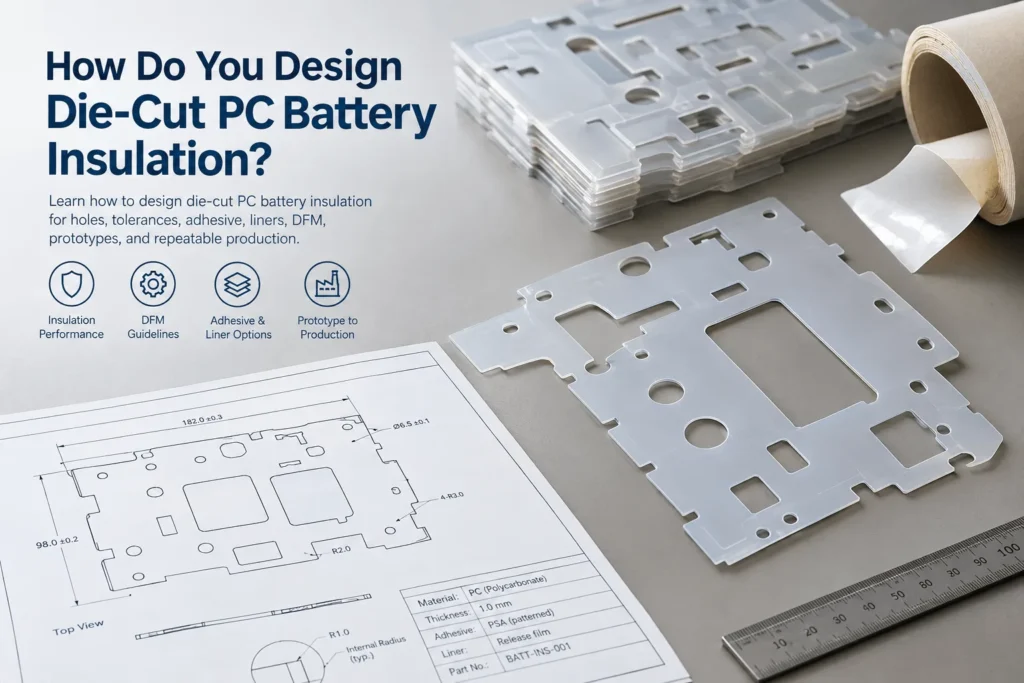
How Do You Design Die-Cut PC Battery Insulation?
Table of Contents
A PC battery insulation drawing can look deceptively simple: an outer profile, several holes, a few slots, and perhaps a pressure-sensitive adhesive layer. Once that drawing reaches production, however, narrow webs, sharp internal corners, tight tolerances, liner removal, material stiffness, tooling, and part handling can determine whether the component converts cleanly and assembles consistently. Designing die-cut PC battery insulation therefore means engineering the complete manufactured component—not merely creating a two-dimensional outline for a cutting tool.
To design die-cut PC battery insulation, first define the electrical, mechanical, thermal, and assembly requirements. Select the PC grade and thickness before optimizing geometry for converting. Review holes, slots, cutouts, internal radii, narrow webs, edge distances, critical tolerances, adhesive zones, release liners, and locating features. Prototype the part with an appropriate process, evaluate it in the actual battery assembly, and finalize production tooling only after fit, insulation, handling, liner removal, and manufacturing requirements have been validated. The material, drawing, converting process, and assembly method should be treated as one system.
Key Takeaways
- A converter needs to understand what the insulation part does, not only what its DXF profile looks like.
- PC grade and thickness should be defined early because they influence cutting behavior, stiffness, feature robustness, forming, handling, and tooling strategy.
- Holes, slots, narrow webs, internal corners, fastener openings, and edge distances affect both manufacturability and the installed electrical/mechanical geometry.
- Tolerances should be function-driven: critical interfaces deserve tighter control than cosmetic or non-functional edges.
- Adhesive pattern, adhesive-free zones, release liner, pull tabs, and kiss-cut presentation are assembly-design decisions, not afterthoughts.
- Prototype cutting and mass-production tooling may use different processes. Production tooling should follow fit and assembly validation, not precede it.
Start With the Battery Application, Not the Die-Cut Shape
The first DFM question should not be, “Can you cut this DXF?” It should be, “What must this component do after it is installed?” A two-dimensional profile contains almost none of the context needed to judge whether the selected PC grade, thickness, hole pattern, adhesive, or tolerance scheme is appropriate. The same outline could be a busbar shield, FPC cover, module liner, terminal barrier, end-area insulator, or protective panel, and each location creates different electrical and mechanical constraints.
Before geometry is frozen, define the installation location, electrical function, mechanical function, working voltage or program-specific insulation requirements, neighboring conductive structures, operating and local temperature conditions, available package space, assembly sequence, required flame classification, adhesive need, service/rework expectations, and expected production volume. These inputs tell the converter which drawing features are truly critical and which can be simplified for manufacturing.
| Design Input | Why It Matters | Information Needed |
| Installation location | Defines neighboring hardware, space, access, and likely failure modes | Module area, mating surfaces, conductor locations, photos/CAD if available |
| Electrical function | Determines whether the part is a solid barrier, cover, spacer, or secondary protection | Working voltage, required tests, critical separation zones |
| Mechanical function | Controls stiffness, handling, point-contact, and support needs | Loads, fasteners, unsupported areas, sharp-edge exposure |
| Environment | Changes material, adhesive, and dimensional behavior | Operating/peak temperature, cycling, humidity, fluids if relevant |
| Assembly process | Drives tabs, liner, orientation, adhesive, and presentation | Manual/robotic placement, sequence, rework method |
| Production volume | Influences prototype and production process choices | Prototype quantity, ramp timing, annual volume |
How Do You Select the PC Grade Before Die Cutting?
Material selection should precede detailed geometry optimization. “PC” is a polymer family, not one universal converting specification. Standard PC, flame-retardant PC, coated films, textured films, optically clear grades, and formable films can differ in thickness availability, surface construction, stiffness, flame classification, forming response, adhesive compatibility, and handling behavior. Covestro, for example, lists die-cutting/punching and lamination as processing technologies for its Makrofol PC film portfolio, while individual product pages warn that typical data are not binding specifications and can vary with processing conditions.
For an EV battery component, screen the candidate grade against the electrical requirement, mechanical role, temperature environment, required flame classification, surface or masking needs, forming/bending requirement, thickness availability, and any approved-material restrictions. If a UL 94 classification is required, verify the exact material designation and applicable thickness rather than assuming that all flame-retardant PC is V-0 at every gauge. If the grade is still open, the RFQ should state required performance and application conditions so the converter can review viable constructions.
How Does PC Thickness Affect Die-Cut Part Design?
Thickness influences more than electrical barrier thickness. From a converting perspective, it changes stiffness, cutting load, handling, flatness, feature robustness, part stripping, forming behavior, packaging, and how easily a component can be removed from a liner or carrier. It can also change which production process is economical. A thin film that is ideal for kiss-cut presentation may behave very differently from a thicker, self-supporting sheet with the same outer profile.
Gauges such as 0.3, 0.5, 0.8, 1.0, 1.5, or 2.0 mm can be useful engineering examples when available in the selected grade, but none is a universal recommendation. A thickness that works for a broad cover may be unnecessary for a fully supported film, while a thin part with long narrow arms may be difficult to handle even if its dielectric properties appear adequate. Thickness must be reviewed together with grade, geometry, support conditions, cutting process, and assembly method.
How Should You Design Holes in PC Battery Insulation?
Holes are among the most common sources of hidden DFM problems because the drawing often treats them as isolated diameters. In the finished component, a mounting hole interacts with the outer edge, nearby holes, fastener head, washer, local clamping, conductor position, and tolerance stack. An alignment hole may need positional accuracy but carry almost no load; a fastener hole may see compression and bring conductive hardware through the insulation boundary.
Review hole diameter, hole-to-edge distance, hole-to-hole spacing, remaining material, fastener or washer envelope, local stress, electrical separation, and assembly alignment as one feature set. There is no defensible universal minimum hole diameter for die-cut PC battery insulation: practical limits depend on PC grade, thickness, tool construction, geometry, process capability, and the required edge quality. Where a hole is electrically critical, specify the functional relationship to the conductor or fastener rather than tightening every dimension on the drawing.
How Do Slots and Cutouts Affect Die-Cut PC Parts?
Slots and cutouts provide access for terminals, connectors, sensors, busbars, weld zones, fasteners, or assembly features, but every removed area changes the remaining structure. A large window can reduce stiffness and flatness. A long narrow slot can leave a fragile strip beside the perimeter. A rectangular opening can create internal corners that become stress concentrators during handling or bending. An access opening can also change the shortest surface or air path around conductive hardware.
For each cutout, ask what function requires the opening, whether the opening can be smaller or simpler, how much material remains around it, and whether the part will be pulled, peeled, flexed, or clamped during assembly. Simplifying an opening often improves both tooling robustness and component handling without changing the electrical function.

Why Do Narrow Webs Matter in Die-Cut PC Insulation?
A narrow web is the remaining strip of PC between two holes, between a hole and the outer edge, between adjacent slots, or between a cutout and the perimeter. These regions can become the weakest parts of an otherwise robust component. They may stretch during part stripping, deform when an operator removes the part from a liner, twist during packaging, or tear if the surrounding geometry creates a notch-like condition.
Narrow webs also complicate tooling because closely spaced cut lines leave less material to stabilize the part during cutting and stripping. The minimum practical web width cannot be stated responsibly without the material grade, thickness, tool type, cut sequence, part size, and production process. The DFM goal is therefore not to chase a generic number, but to identify fragile webs early and either widen them, change the surrounding feature, add temporary carrier support, or validate them in prototypes.
Why Avoid Sharp Internal Corners?
Sharp internal corners are often inherited from CAD packaging boundaries, but they can be poor manufacturing details when a small radius would perform the same function. Internal corners concentrate local stress, can reduce robustness during flexing or forming, and may complicate tool construction. If the part is later cold-bent, the interaction among material stiffness, thickness, and bend radius becomes even more important; Tekra notes that cold forming introduces surface stress and that thickness and bend radius are key variables.
Use the largest practical internal radius that still clears the neighboring hardware and preserves the required electrical boundary, then confirm manufacturability with the converter. There is no universal minimum radius for all PC grades and thicknesses. A radius that is easy in one thin film construction may be inappropriate in a thicker or formed component.
How Should Tabs and Locating Features Be Designed?
A production insulation part should help the assembly process. Positioning tabs, alignment tabs, pull tabs, asymmetric orientation features, and poka-yoke geometry can reduce the chance of installing a symmetric-looking component incorrectly. A tab can also provide a non-functional area for gripping the part without touching adhesive or a critical dielectric surface.
These features still need DFM. A long thin tab can fold or tear; a locating notch can create a narrow web; an oversized pull tab can interfere with adjacent components. Define whether each feature is permanent, removed after assembly, used by an operator, or used by automation. A good design does more than fit the CAD envelope—it fits the manufacturing and assembly sequence.
How Tight Should Die-Cut PC Tolerances Be?
The tightest possible tolerance is rarely the best drawing strategy. Tolerance should follow function. Terminal openings, locating holes, fastener interfaces, busbar clearances, edge-to-conductor relationships, or mating features may justify tighter control because variation can affect fit or insulation geometry. A cosmetic outer edge or non-functional perimeter may not need the same inspection burden.
Applying unnecessarily tight tolerances to every feature can increase tooling complexity, inspection time, scrap, and process sensitivity without improving the battery. Use a critical-to-function dimension scheme: identify the dimensions that control electrical separation, alignment, fastening, or assembly; apply realistic general tolerances elsewhere; and define datums that match how the part is actually located. Boost’s website advertises precision converting, but this article should not convert a marketing capability into a universal tolerance promise for every PC construction. The achievable tolerance should be confirmed against the actual drawing, thickness, material, tool, and process.
How Do Fasteners Affect Die-Cut PC Insulation?
Fasteners combine geometry, local stress, and electrical separation in one location. A screw head or washer can clamp the PC, a conductive shank can pass through the insulation plane, and hole-position variation can shift the part relative to a terminal or metal frame. Excessive preload or a small bearing area can also create local deformation, particularly when the PC is trapped between harder components.
During DFM, review the fastener head and washer envelope, hole position, clamped stack thickness, expected preload or assembly method, surrounding edge distance, and whether the conductive hardware changes the intended insulation boundary. The converter does not need to redesign the electrical system, but the drawing should make electrically critical fastener relationships visible instead of treating the hole as an isolated circle.
Should PC Battery Insulation Use Adhesive?
Sometimes. Pressure-sensitive adhesive can retain a PC part during assembly, provide temporary positioning before fasteners are installed, support permanent bonding, or make robotic placement easier. A self-supporting cover may not need adhesive at all, while a thin film on a vertical surface may depend on it for location. The decision should come from the assembly architecture rather than a default rule that every die-cut insulator needs full-surface tape.
Adding adhesive changes the component. It adds stack thickness, can influence flatness or curl, changes rework behavior, introduces its own temperature and aging limits, affects die-cutting and stripping, and requires a release liner. Adhesive compatibility with the PC surface and mating substrate should be evaluated under the program’s environmental conditions. The finished laminate—not the PC film alone—is the production component.
What Are Adhesive-Free Zones?
An adhesive-free zone is an intentionally uncoated or unlaminated region of the PC component. It may be useful around a fastener, terminal, grounding point, inspection area, service feature, vent path, connector, or location that must remain reworkable. It can also create a clean gripping area or reduce the chance of adhesive squeeze-out near a critical opening.
The adhesive pattern should therefore be drawn intentionally rather than generated by copying the entire PC perimeter. Define which areas need retention, which areas must remain free, and how the adhesive edge relates to holes and cutouts. Patterned adhesive may require additional converting steps, so it should be included in the DFM and quotation stage rather than added after tooling is complete.
Why Does Release Liner Design Matter?
The release liner is part of the assembly interface. It controls how an operator or robot picks up the part, which direction the adhesive is exposed, whether the PC bends during peeling, and how easily the adhesive surface can be kept clean. A poorly designed liner can make a dimensionally correct component frustrating to install and can create more variation than the die-cut profile itself.
Options can include a full liner, split liner, extended liner, pull tab, partial liner removal, or kiss-cut presentation on a larger carrier. The best choice depends on part stiffness, adhesive coverage, peel direction, assembly access, automation, and whether the part must be repositioned. Liner geometry should be reviewed during prototype assembly trials, not only at the packaging stage.
What Is Kiss Cutting for PC Battery Insulation?
Kiss cutting is a converting method in which the intended material layer or laminate is cut while the release liner or carrier remains substantially intact. For adhesive-backed insulation, this can keep multiple parts organized on a sheet or roll, reduce loose-part handling, and give an operator or automated system a predictable presentation surface. Boost’s existing battery-module content specifically describes kiss-cut release liners as a way to support peel-and-place assembly.
Kiss cutting is not automatically suitable for every PC construction. Material thickness, stiffness, adhesive, liner type, cut depth control, part geometry, and converting equipment all matter. A thick self-supporting PC panel may be better supplied as an individual part, while a thin adhesive-backed film may benefit substantially from carrier presentation.

Die Cutting vs CNC Cutting for PC Battery Insulation
Prototype and production stages do not need to use the same cutting process. CNC cutting can be useful when geometry is changing, quantities are low, or tooling should be deferred until fit is confirmed. Die cutting becomes attractive when the two-dimensional geometry is stable and repeatable production, integrated adhesive converting, kiss cutting, or high throughput is required. Boost publicly lists both die-cutting and CNC processes for EV battery insulation, so the practical choice can be made by project stage rather than by forcing one process onto every part.
| Factor | Die Cutting | CNC Cutting |
| Prototype stage | Possible, especially with flexible tooling or simple shapes | Strong use case when drawings are still changing |
| Design changes | May require tool modification or replacement | Generally easier to implement digitally |
| Production volume | Strong use case after geometry is stable | Often better suited to prototype/low-volume or special parts |
| Tooling | Production cutting tool is part of process planning | No dedicated die required |
| 2D profiles | Highly suitable | Highly suitable |
| Adhesive / liner integration | Strong converting advantage | Possible but often handled as separate operations |
| Thicker/evolving parts | Process-dependent | Often useful, subject to material and machine capability |
| Repeatability | Strong when tool and process are controlled | Depends on machine, fixturing, program, and material |
When Should You Prototype Before Production Tooling?
Prototype before production tooling whenever geometry is new, fit is uncertain, adhesive or liner behavior is unproven, hole positions are critical, the assembly method is new, or the material grade or thickness has changed. In practice, that covers most new battery insulation components. The purpose is not simply to prove that a part can be cut; it is to discover whether the manufactured component behaves correctly in the module.
A useful prototype trial checks fit, flatness, alignment, hole position, terminal and connector access, installation sequence, adhesive peel, liner removal, mechanical interference, edge condition, handling damage, and the intended electrical separation. It should also reveal whether operators need a pull tab, whether a symmetric part can be installed backward, or whether a nominally non-critical edge actually controls assembly. Freeze production tooling only after these lessons are incorporated into the drawing.
What Should Be Checked During DFM Review?
| DFM Item | Why It Matters | What to Review |
| Material grade | Controls electrical, mechanical, flame, surface, and process behavior | Exact grade or required performance; approval constraints |
| Thickness | Affects stiffness, cutting, handling, stack-up, and forming | Availability, function, space, process |
| Outer profile | Controls fit and material utilization | Functional edges, simplification, nesting |
| Holes | Affect alignment, stress, and electrical geometry | Diameter, position, edge distance, fastener envelope |
| Slots/cutouts | Can weaken the part and create fragile regions | Width, length, corner design, remaining material |
| Narrow webs | May tear or deform during stripping/assembly | Location, width relative to construction, carrier support |
| Internal corners | Can concentrate stress and complicate tooling | Practical radius, neighboring clearance |
| Tabs/features | Support orientation and handling but can become fragile | Purpose, size, removal, poka-yoke |
| Adhesive zones | Control retention and stack-up | Coverage, substrate, edge setback, rework |
| Release liner | Controls peel-and-place behavior | Split, tab, carrier, peel direction |
| Tolerances | Drive tooling and inspection burden | Critical vs general dimensions, datums |
| Flatness | Affects installation and automation | Part size, thickness, adhesive, storage |
| Packaging | Prevents transport deformation and contamination | Stacking, interleaving, carrier, orientation |
| Assembly orientation | Reduces installation errors | Labels, asymmetry, locating features |
Adhesive and Liner Design for Production Assembly
| Design Element | Function | Key Consideration |
| Full-surface PSA | Broad retention | May add stack-up, curl, rework difficulty, and unnecessary adhesive near openings |
| Patterned PSA | Retention only where needed | Registration, converting complexity, edge setback |
| Adhesive-free zone | Keeps functional areas clean/reworkable | Fasteners, terminals, inspection, grounding, vents |
| Full release liner | Protects entire adhesive surface | Peel access and part bending during removal |
| Split liner | Allows staged exposure | Split location and assembly sequence |
| Extended liner / pull tab | Improves grip without touching adhesive | Tab interference and automation compatibility |
| Kiss-cut carrier | Keeps parts organized for peel-and-place | Cut-depth control, part stiffness, carrier format |
Common Mistakes in Die-Cut PC Battery Insulation Design
- Sending only a DXF without explaining installation location, function, environment, or assembly method.
- Freezing the drawing before the PC grade and thickness have been reviewed.
- Applying the same tight tolerance to every feature instead of identifying critical-to-function dimensions.
- Creating very narrow webs between holes, slots, or the perimeter without a converting review.
- Using sharp internal corners when a practical radius would preserve function and improve robustness.
- Ignoring hole-to-edge relationships and the remaining material around fasteners or openings.
- Drawing the PC hole without showing the screw head, washer, clamp, or neighboring conductive geometry.
- Applying adhesive over the full part by default instead of defining where retention is actually needed.
- Leaving release-liner design until after the component and tooling are finalized.
- Assuming the prototype cutting method must be identical to the production method.
- Ignoring how the part will be stripped from the die-cut sheet or carrier without bending fragile features.
- Ignoring packaging, stacking, protective film, and transport deformation for large or thin PC parts.
- Treating raw-material data as proof of finished-part performance after cutting, forming, bonding, fastening, and aging.
Material Datasheet vs Finished Die-Cut PC Part
A raw PC datasheet describes standardized material specimens under defined test conditions. It does not automatically describe a battery part after holes, slots, narrow webs, die-cut edges, CNC machining, bends, adhesive lamination, fastener preload, thermal cycling, assembly stress, and aging have been introduced. Covestro explicitly notes on individual product pages that typical values are not binding specifications and that performance can vary with processing conditions. That distinction is especially important when a drawing converts a broad sheet into a geometry with small load paths or critical electrical openings.
Finished-component validation should match the program’s risk and requirements. Depending on the part, that may include dimensional inspection, assembly fit, electrical testing, thermal cycling, humidity exposure, vibration, fastener assembly, adhesive retention, liner removal trials, flatness checks, and post-test visual inspection. The converter should preserve the agreed material and process; the OEM or Tier 1 should define the validation criteria appropriate to the battery system.

Industry Insights for Die-Cut Battery Insulation
1. Battery insulation is becoming more geometry-specific
Compact modules leave less room for generic rectangular sheets. Covers and barriers increasingly need windows, tabs, local clearances, adhesive patterns, and assembly features tailored to nearby conductors and hardware.
2. DFM should begin before the drawing is frozen
The cheapest time to widen a web, add a radius, simplify a cutout, or change a liner is before production tooling. A converter can often remove cost and risk without changing the insulation function if involved early.
3. Assembly features can be as important as material properties
A part with excellent dielectric properties can still create production variation if operators cannot orient, peel, or position it consistently. Tabs, asymmetry, liner splits, and visual features can therefore be functional engineering details.
4. Adhesive and liner architecture increasingly affects automation
As battery assembly becomes more automated, the way a part is presented to a robot or operator matters. Carrier format, peel direction, adhesive exposure, and part stiffness can determine cycle-time stability.
5. Prototype and mass-production processes can differ
CNC can accelerate learning while geometry is fluid; die cutting can optimize repeatability and integrated converting after the design stabilizes. Requiring one process from the first prototype can slow iteration unnecessarily.
6. Geometry and tolerance simplification can be a major cost lever
Material price is visible, but unnecessary cut complexity, tight tolerances, difficult stripping, excessive adhesive coverage, and inspection burden can also drive cost. DFM should address the total manufactured component.
Engineering Design Checklist
- Confirm installation location and the primary electrical and mechanical functions.
- Identify the exact PC grade or document the required performance if material selection is open.
- Confirm nominal thickness and whether alternate gauges may be prototyped.
- Verify required flame classification on the exact grade and relevant thickness when applicable.
- Document operating temperature, local hot spots, cycling, humidity, and other relevant environmental conditions.
- Review outer dimensions, holes, slots, cutouts, narrow webs, internal radii, and edge distances.
- Show fastener heads, washers, terminals, connectors, and other neighboring geometry that controls the opening.
- Define positioning, orientation, pull, or poka-yoke tabs and whether they remain after assembly.
- Separate critical tolerances from general tolerances and define functional datums.
- Define adhesive zones, adhesive-free zones, edge setbacks, and rework requirements.
- Define release-liner construction, peel direction, pull tabs, and carrier presentation.
- Confirm protective film or masking requirements and when they are removed.
- Validate assembly orientation, part removal from the carrier, and handling without damage.
- Run representative prototype fit and assembly trials before freezing production tooling.
- Define packaging so thin or large parts are not distorted or contaminated in transport.
RFQ Checklist for Custom Die-Cut PC Insulation
- 2D drawing in PDF plus DXF/DWG when available; 3D CAD for assembly context when available.
- Installation location and a short description of the insulation part function.
- PC material designation, approved material list, or required performance if the grade is not fixed.
- Nominal thickness and acceptable alternatives for prototype evaluation.
- Working voltage and applicable insulation/test requirements.
- Operating/peak temperature and environmental conditions.
- Required flame classification and applicable thickness if specified by the program.
- Overall dimensions, holes, slots, cutouts, tabs, bend/form lines, and critical edge relationships.
- Critical tolerances clearly distinguished from general tolerances.
- Adhesive type or performance requirement, coverage, and adhesive-free zones.
- Release-liner, split-liner, pull-tab, carrier, or kiss-cut presentation requirements.
- Protective film, printing, identification, cleanliness, and packaging requirements.
- Prototype quantity, target timing, annual volume, and expected production ramp.
- Finished-component validation and documentation requirements.
How Boost Insulation Supports Die-Cut PC Battery Parts
Boost Insulation’s current EV battery module and flame-retardant polycarbonate pages describe DFM review, die cutting, CNC processing, adhesive/protective-film lamination, custom fabrication, and prototype support. Those capabilities fit the workflow required for a PC insulation component: review the application and drawing, select or confirm the construction, choose a prototype process, evaluate fit and assembly, then move to production tooling and repeatable converting.
For a new project, the useful starting package is not just a profile file. Send the drawing together with the installation location, material or performance requirement, thickness, critical dimensions, adhesive/liner needs, prototype quantity, and annual volume. That gives the manufacturing team enough context to identify fragile webs, difficult cutouts, unnecessary tolerances, liner opportunities, and features that may be better validated by CNC before a production die is committed.
Frequently Asked Questions
Can polycarbonate battery insulation be die cut?
Yes. Polycarbonate film and sheet are commonly compatible with die-cutting and punching processes, and manufacturers such as Covestro list die-cutting/punching among PC film processing technologies. Suitability still depends on the exact grade, thickness, surface construction, geometry, edge-quality requirement, adhesive stack, and equipment. A production drawing should be reviewed for holes, slots, narrow webs, internal corners, part stripping, and carrier presentation before tooling is finalized.
What thickness of PC can be die cut?
There is no single thickness range that applies to every PC grade, die type, machine, geometry, and quality requirement. Thin films and thicker sheets can both be converted, but the appropriate process and tooling may change as stiffness and cutting load increase. Instead of specifying a universal limit, provide the exact grade, nominal thickness, part size, geometry, tolerance, and volume so the converter can determine whether die cutting, CNC cutting, or another process is appropriate.
How small can holes be in die-cut PC insulation?
A universal minimum hole diameter is not technically reliable. The practical limit depends on material grade, thickness, tool construction, hole spacing, edge distance, part size, cutting process, and required edge quality. Small holes can also leave fragile webs or become difficult to align with fasteners. Define the functional hole requirement and surrounding geometry, then have the converter review manufacturability before the drawing is released.
Why do narrow webs matter in PC insulation parts?
Narrow webs are the remaining strips of material between holes, slots, cutouts, or the outer edge. They can deform or tear during cutting, stripping, liner removal, packaging, or assembly, and may reduce the dimensional stability of the finished part. The minimum practical width is material-, thickness-, geometry-, tooling-, and process-dependent, so fragile webs should be identified in DFM rather than designed to a generic rule.
Should die-cut PC battery insulation use adhesive?
Only when the assembly needs it. Adhesive can hold a part in position, support temporary fixation, enable permanent bonding, or improve automated placement. It also adds stack thickness, liner requirements, aging considerations, rework constraints, and additional converting steps. Some rigid PC covers are mechanically located and need no PSA. If adhesive is used, define coverage and adhesive-free zones according to the assembly rather than coating the entire part by default.
What is kiss cutting for battery insulation?
Kiss cutting cuts the intended insulation or adhesive construction while leaving a carrier or release liner substantially intact. This can present multiple parts on a sheet or roll, reduce loose-part handling, and support peel-and-place assembly. It is particularly useful for some thin adhesive-backed insulation components. Suitability depends on PC thickness and stiffness, adhesive, liner construction, geometry, cut-depth control, and the converter’s equipment.
Is CNC cutting or die cutting better for PC insulation?
Neither is universally better. CNC cutting is often useful for prototypes, changing geometry, low volumes, or parts where dedicated tooling should be delayed. Die cutting is often efficient once a two-dimensional design is stable and repeatable production, adhesive lamination, kiss cutting, or higher throughput is needed. Many programs use CNC during development and die cutting for production, but the best route depends on the actual part.
What files are needed to quote custom PC insulation?
Provide a dimensioned PDF drawing plus DXF or DWG when available; 3D CAD is useful for assembly context. Also provide the PC grade or required performance, thickness, installation location, working voltage or insulation requirement, temperature, flame requirement, critical tolerances, adhesive and liner needs, prototype quantity, annual volume, packaging, and validation requirements. If the material is not selected, provide application conditions rather than choosing a grade without review.
Conclusion
Designing die-cut PC battery insulation is a component-engineering task, not a drawing-export task. The electrical and mechanical function determines the material; the material and thickness influence geometry and converting; geometry determines where holes, slots, webs, corners, and tolerances become critical; and adhesive and liner choices determine how the part behaves on the assembly line. Prototype learning should close that loop before production tooling is frozen.
CTA: If you are developing a custom die-cut PC battery insulation part, send your 2D drawing or CAD file, installation location, PC grade or material requirements, thickness, critical tolerances, adhesive requirements, prototype quantity, and annual volume for a DFM review.
Related Posts:
Why Use FR4 as Rigid Insulation in EV Battery Packs?
What Makes Flame Retardant Polycarbonate Ideal For Batteries?
How Thick Should PC Insulation Be in EV Batteries?
How Does FR4 Insulate EV Battery Busbars?
How Does a Mica Insulation Sheet Compare With FR4 Boards?
How Is a Mica Insulation Sheet Used on Module End Plates?
 betty wong